
Imagine you’re writing a complex piece of software. You need to run a heavy calculation, but your local machine is already struggling. Wouldn’t it be great if you could just “borrow” the brain of a high-powered server sitting miles away, but without writing 500 lines of messy networking code?
That’s exactly what RPC remote procedure does. It’s the ultimate “cheat code” for developers.
In this guide, we aren’t just going to look at dry definitions. We’re diving deep into the RPC remote procedure, the messy reality of distributed systems, and how this tech connects to everything from the OSI model layers to the autonomous AI agents of tomorrow.
1. What is RPC remote procedure Really? (Beyond the Textbook)
We’ve all seen the standard open system definition: a protocol that one program uses to request a service from a program located on another computer. But let’s be real—that’s boring.
Think of RPC as a teleportation device for functions.
Usually, if you want to talk to a remote server, you have to handle “The Three Headaches”:
- Setting up a connection.
- Formatting the data (Serialization).
- Dealing with lost packets.
RPC says, “Forget all that. Just call the function like it’s right there in your file.” It creates an abstraction where the network architecture becomes invisible. This is the heart of an open system interface—it makes different machines feel like one giant, unified computer.
2. The Secret Sauce: Stubs, Marshalling, and Runtimes
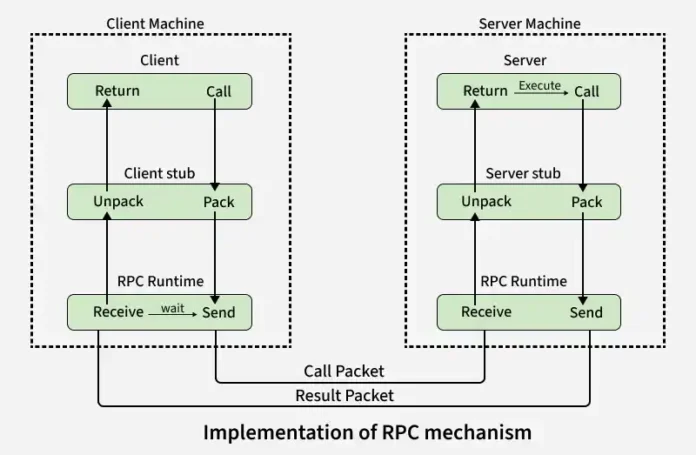
How does RPC pull off this magic trick? It uses a middleman. In the world of networking layers, these middlemen are called Stubs.
The “Stubs” (The Proxies)
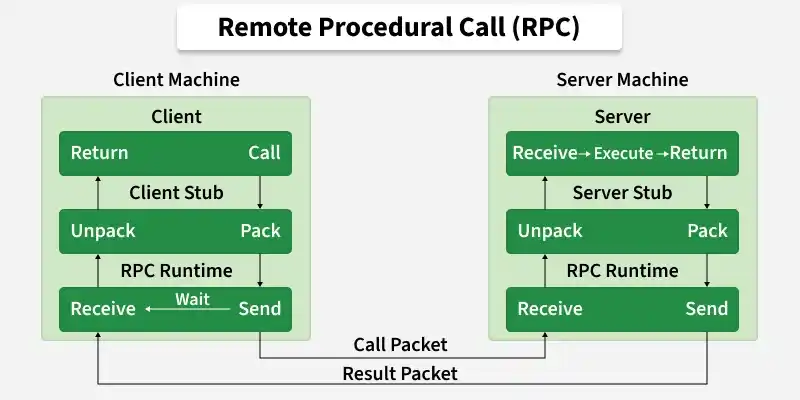
When you trigger a call, you aren’t actually talking to the server. You’re talking to a Client Stub.
- The Client Stub is like a travel agent. You tell it where you want to go, and it handles the passport, tickets, and luggage.
- The Server Stub is the concierge on the other side. It receives the luggage, unpacks it, and makes sure the local server knows exactly what to do.
Marshalling: Packing the Suitcase
Computer A might be a Mac, and Computer B might be a Linux server. They might store numbers or strings differently. Marshalling is the process of converting your local data into a “Network Standard” format. It’s like putting all your belongings into a standardized shipping container so they don’t break during the information communication model journey.
3. The 7-Step Dance of the RPC remote procedure Mechanism
Let’s look at the RPC mechanism in distributed system environments. It’s a carefully choreographed dance:
- The Trigger: The client app calls a local procedure.
- The Wrap: The client stub packs the parameters (Marshalling).
- The Hand-off: The local OS sends the message to the remote OS.
- The Journey: Data travels through the osi reference model 7 layers (usually Layer 4: Transport).
- The Arrival: The server OS hands the packet to the server stub.
- The Execution: The server stub unpacks it (Unmarshalling) and runs the actual code.
- The Encore: The whole process happens in reverse to bring the answer back.
4. The RPC remote procedure Message Protocol: What’s Inside the Packet?
Every RPC message is like a formal letter. If it doesn’t have the right address and stamp, it gets ignored. The RPC message protocol usually includes:
- Program and Version Numbers: Because calling Version 1.0 of a function when the server is on 2.0 is a recipe for disaster.
- Procedure Number: “I don’t just want to talk to Program X; I want to run Function Y inside it.”
- Authentication: In the era of cybersecurity, you can’t just let anyone run code on your server. This verifies who is asking.
This structure is what allows osi systems to remain secure while being “Open.”
5. RPC remote procedure vs. The OSI Model: Where Does it Sit?
If you read my last blog on the 7 layers of OSI model, you know that every piece of tech has a “home.”
RPC traditionally lives at the Session Layer (Layer 5). Why? Because its job is to manage the “Dialogue” between two machines. However, it relies heavily on the Network Layer (Layer 3) for routing and the Physical Layer (Layer 1) for the actual cables.
When we talk about a Reference Interconnect Offer (RIO), we are talking about the “Legal” way networks connect. RPC is the “Technical” way the software actually uses that connection to get work done.
6. The “Gotchas” of Distributed Computing
Local calls are easy. Remote calls are hard. Here is why:
The “Exactly Once” Nightmare
If you click “Pay” on a website and the network glitches, should the browser send the request again? If it does, and the server receives it twice, you might get charged twice. This is a classic communication models problem in RPC. Engineers have to build complex logic to ensure a procedure happens exactly once.
The Latency Wall
A local function call takes nanoseconds. An RPC call across the Atlantic takes 100+ milliseconds. If you have a warmup cache ready, you might shave off some time, but the speed of light is a hard limit in network architecture.
7. Looking Forward: From RPC remote procedure to gRPC and AI
The future isn’t just about one computer talking to another; it’s about autonomous AI agents talking to each other.
In a few years, your phone might use a high-speed RPC stack to ask a medical AI server to analyze your biometric data in real-time. This requires a level of interconnection define that we are only just beginning to build. Modern frameworks like gRPC (using HTTP/2) are already making this faster and more efficient than the old osi/rm models.
The Different Flavors: Types of RPC Explained
In a perfect world, every network call would be instant. But in the real world of distributed systems, we have to deal with lag, server crashes, and multitasking. This is why engineers have developed different types of RPC remote procedure to handle various scenarios.
A. Synchronous RPC (The “Wait and See” Approach)
This is the most common type. Think of it like a traditional phone call. You dial a number (the procedure call), the other person picks up, you ask a question, and you wait on the line until they give you an answer.
- How it works: The client process is blocked (suspended) until the server returns a result.
- The Downside: If the network is slow or the server is busy, your entire application might “freeze” while waiting.
B. Asynchronous RPC (The “Text Message” Approach)
In an asynchronous model, the client doesn’t like waiting. It sends the request and then goes back to doing other things.
- How it works: The client initiates the call and immediately moves on to the next line of code. When the server is done, it sends a notification or a “callback” to the client.
- Use Case: Perfect for long-running tasks like generating a heavy PDF report or processing a large image.
C. One-Way RPC (The “Fire and Forget”)
Sometimes, you don’t actually need a reply. You just want to tell the server to do something.
- How it works: The client sends the request but doesn’t wait for an acknowledgment. It doesn’t even care if the server received it.
- Use Case: Great for logging system errors or sending telemetry data where losing a packet here and there isn’t a disaster.
D. Deferred Synchronous RPC (The “Check Back Later”)
This is a hybrid. The client sends a request and continues working, but it eventually reaches a point where it must have the answer to proceed.
- How it works: The client does its own work for a while and then “polls” or waits at a specific synchronization point for the server’s response.
E. Broadcast RPC
In some network architectures, a client needs to talk to everyone at once.
- How it works: The client sends a message that is broadcast to all nodes on the network. The first server that can handle the request picks it up and processes it.
8. RPC vs. REST: Why the Debate Matters
If you’re into web development, you’ve probably used REST APIs. So, why bother with RPC remote procedure?
| Feature | RPC | REST |
| Action | Action-oriented (Run calculateTotal()) | Resource-oriented (GET /orders) |
| Coupling | Tight coupling (Client and Server must know the function) | Loose coupling (Standardized methods like GET/POST) |
| Performance | Extremely fast (especially gRPC/Protobuf) | Slower (JSON overhead) |
| Interface | Focuses on Open System Interface | Focuses on Web Standards |
For internal microservices where speed is king, RPC remote procedure stack models almost always beat REST. But for public-facing APIs, REST is usually the winner.
The Double-Edged Sword: Pros and Cons of RPC
Every architect knows that there’s no such thing as a “perfect” technology—only trade-offs. While RPC remote procedure (RPC) is the powerhouse behind most distributed systems, it comes with its own set of brilliant wins and frustrating headaches.
The Upside: Why Developers Love RPC (Pros)
- The “Local” Illusion: The biggest win is abstraction. RPC hides the messy internal message-passing mechanism. As a developer, you don’t have to deal with sockets or byte-streams; you just call a function. It’s like driving a car without needing to understand how the fuel injection system works.
- Language Agnostic: RPC remote procedure is great at bridging gaps. You can have a client written in Java talking to a server written in Python. It helps different OSI systems communicate through traditional procedure calls, regardless of the “language” they speak.
- Performance Lean-Machine: To stay fast, RPC often skips several unnecessary protocol layers. By keeping the stack light, it achieves much lower latency than standard web APIs, which is crucial for high-speed network architecture.
- Versatile Deployment: Whether your processes are sitting on the same machine (local) or spread across a global distributed environment, RPC remote procedure doesn’t care. It supports both process-oriented and thread-oriented models with ease.
The Reality Check: Where RPC Hits a Wall (Cons)
- Complexity of Environments: Unlike a local call where everything shares the same RAM and CPU, RPC remote procedure involves two different execution environments. This makes resource management a nightmare. If you try to transfer massive amounts of data (like a 4GB video file) via RPC, the system will likely choke. It’s meant for “calls,” not heavy-duty hauling.
- The Fragility Factor: In a local program, if the code is good, it runs. In RPC, you are at the mercy of the communication system. If a router dies, a cable is cut, or the remote machine hangs, your call fails. It introduces more “points of failure” into your information communication model.
- Rigid Architecture: RPC isn’t as “loose” or flexible as REST APIs. In REST, you can just hit a URL and see what happens. In RPC, the client and server need to be tightly synced (often sharing the same stubs).
Summary: Why You Should Care
Understanding how to network via RPC remote procedure is like learning how the engine of a car works. You might not see it, but it’s what makes everything move.
- It simplifies network architecture.
- It enables open system interface standardisation.
- It’s the backbone of every cloud service you use today.

