Home Blog

The Ultimate Guide to Reference Interconnect Offer (RIO) and the OSI Reference Model

0
Reference Interconnect Offer

In the modern digital era, communication isn’t just about cables and signals; it’s about agreements and standardized architectures. Whether you are a telecom professional or a student learning how to network, two terms define how our global internet functions: the Reference Interconnect Offer (RIO) and the OSI Reference Model (OSI/RM).

As we move towards a future of autonomous AI agents, the way these smart devices communicate over the network depends heavily on a standardized OSI model to ensure seamless data flow.

While RIO defines the “Rules of Engagement” between two service providers, the OSI layers define the “Rules of Communication” between two machines. This guide explores both in exhaustive detail.

Part 1: Understanding Reference Interconnect Offer (RIO)

Before diving into the 7 layers of OSI model, we must understand how to define interconnection in a business context.

What is a Reference Interconnect Offer?

A Reference Interconnect Offer (RIO) is a public document issued by a dominant network operator. It outlines the terms, conditions, and technical specifications under which it will allow other operators to connect to its network.

Interconnection define: It is the physical and logical linking of telecommunications networks used by the same or a different organization to allow users of one organization to communicate with users of another.

Without a standardized RIO, open systems would struggle to coexist. It ensures that network architecture remains transparent, preventing monopolies from blocking smaller competitors.

Part 2: The OSI Reference Model – The Blueprint of Communication

To understand how an interconnection actually works on a bit-by-bit level, we use the Open Systems Interconnection model, commonly known as the OSI Model.

Developed by the ISO, the OSI reference model is a conceptual framework that standardizes the functions of a telecommunication or computing system into seven distinct categories or networking layers.

Why do we call it “Open Systems”?

An open system definition refers to a computer system that provides a combination of interoperability, portability, and open software standards. The open system interface allows hardware from different vendors (like Cisco, Juniper, or Huawei) to talk to each other seamlessly.

Part 3: Deep Dive into the Seven Layers of OSI Model

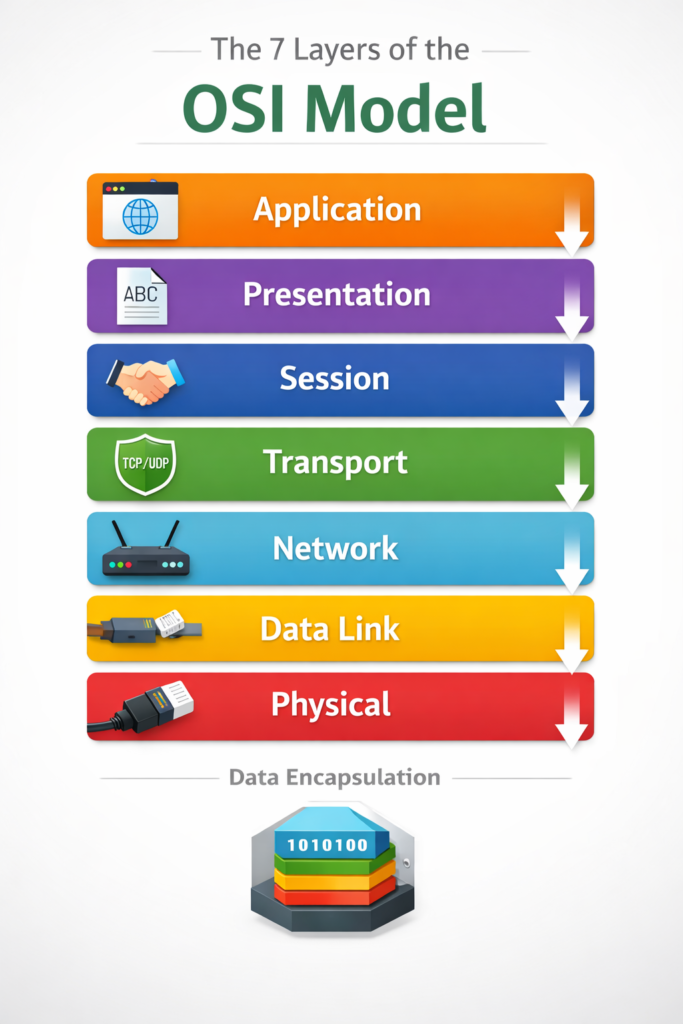
The OSI stack is organized from the highest level (User-facing) to the lowest level (Hardware-facing). Let’s break down the layers of OSI model one by one.7 layers of OSI model, AI generated

1. The Application Layer (Layer 7)

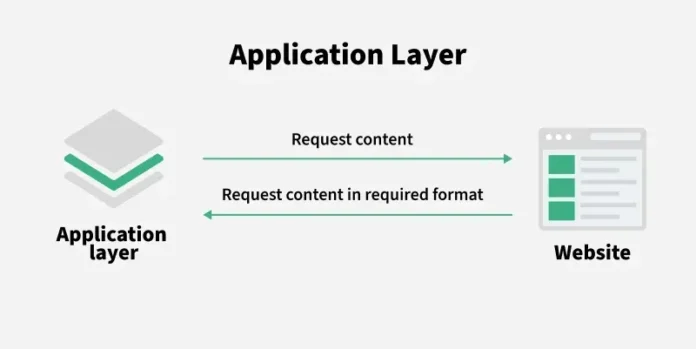
The application layer is where the user interacts with the network. When you use a browser or an email client, you are at Layer 7.

  • Protocol Data Unit (PDU): Data
  • Key Concept: This layer uses an application layer gateway to provide security and protocol translation. It is the window through which open systems access network services.

2. The Presentation Layer (Layer 6)

Often called the “Syntax Layer,” this part of the OSI stack model ensures that data is in a usable format. It handles encryption, compression, and translation.

  • PDU: Data
  • In RIO context: This ensures that the information communication model used by Operator A is readable by the systems of Operator B.

3. The Session Layer (Layer 5)

The session layer manages the “dialogue” between computers. It starts, stops, and restarts sessions.

  • PDU: Data
  • Key Function: It acts as the communication models coordinator, ensuring that if a connection drops, it can resume from a checkpoint.

4. The Transport Layer (Layer 4)

This is where the concept of “End-to-End” communication lives. It handles error recovery and flow control.

  • PDU: Segments
  • Technical Highlight: This layer uses a window framing diagram logic to manage how much data is sent before an acknowledgment is required, preventing the receiver from being overwhelmed.

5. The Network Layer (Layer 3)

The network layer is the heart of routing. It decides the physical path the data will take.

  • PDU: Packets
  • Keywords: Network layers, IP Addressing, Routers.
  • Connection to RIO: Most Reference Interconnect Offers focus heavily on Layer 3, as this is where “Peering” and “Transit” between different OSI systems occur.

6. The Data Link Layer (Layer 2)

This layer provides node-to-node data transfer. It corrects errors that may occur at the Physical Layer.

  • PDU: Frames
  • Hardware: The NIC OSI (Network Interface Card) operates here. It breaks the data into frames and handles MAC addressing.
  • Sub-layers: Logical Link Control (LLC) and Media Access Control (MAC).

7. The Physical Layer (Layer 1)

The bottom-most of the osi stack layers. It deals with the actual physical connection—cables, switches, and radio waves.

  • PDU: Bits
  • Focus: It defines the layers network osi electrical and physical specifications.

Part 4: Technical Components of the OSI R

When writing about layers in CN (Computer Networks) or CN 7, we must look at the specific units and interfaces that make the OSI layer model function.

Protocol Data Unit (PDU)

A Protocol Data Unit is a single unit of information transmitted among peer entities of a computer network. As data moves down the OSI reference model 7 layers, it gets encapsulated:

  1. Data (Layers 7, 6, 5)
  2. Segment (Layer 4)
  3. Packet (Layer 3)
  4. Frame (Layer 2)
  5. Bit (Layer 1)

The Role of NIC in OSI

The NIC (Network Interface Card) is the bridge between your computer and the network. In the OSI rm, it primarily functions at the Data Link Layer but has Physical Layer components (the port where the cable plugs in).

Part 5: How RIO and OSI Model Work Together

You might ask, “How does a legal Reference Interconnect Offer relate to networking layers?”

  1. Physical Interconnection: The RIO specifies the physical locations (Points of Interconnect) where cables meet. This is OSI Layer 1.
  2. Data Link Protocols: The RIO defines if they will use Ethernet, Fiber, or Frame Relay. This is OSI Layer 2.
  3. Traffic Routing: The RIO outlines how IP packets are exchanged between the two open system interface points. This is OSI Layer 3.
  4. Security Gateways: If one operator requires an application layer gateway to filter traffic for security, this is negotiated in the RIO terms and implemented at OSI Layer 7.
reference interconnect offer

Part 6: Why the Seven Layers of Open System Interconnection Still Matter

Even though the modern internet mostly uses the TCP/IP suite, the layers of OSI reference model remain the gold standard for troubleshooting and education.

  • Standardization: It allows different osi systems to work together.
  • Troubleshooting: By using the layer layer osi approach, technicians can isolate problems. If the cable is unplugged, they don’t waste time checking the application layer.
  • Education: Understanding the seven layers of osi model is the first step for anyone learning how to network.

Summary of the OSI Model Layers

Layer #Layer NamePDUFunction
7ApplicationDataNetwork Services to Applications
6PresentationDataData Representation & Encryption
5SessionDataInterhost Communication
4TransportSegmentsEnd-to-End Connections & Reliability
3NetworkPacketsPath Determination & IP (Routing)
2Data LinkFramesPhysical Addressing (MAC & LLC)
1PhysicalBitsBinary Transmission & Cables

Conclusion: The Synergy of Policy and Technology

A Reference Interconnect Offer is more than just a contract; it is a technical blueprint that relies on the OSI model layers to function. By following the OSI reference model, we ensure that open systems remain truly open, allowing for a global, interconnected network architecture.

Whether you are configuring a NIC osi setting, analyzing a window framing diagram, or negotiating a multi-million dollar interconnection define agreement, you are working within the framework of the seven layers of open system interconnection.

Key Takeaways:

  • RIO is the commercial agreement for network sharing.
  • OSI/RM is the 7-layered technical standard for data flow.
  • Encapsulation occurs as data moves through the osi stack model.
  • Open system interface ensures vendor neutrality in networking layers.

Master Guide: Warmup Cache Request – The Secret to Zero Latency in 2026

0
Warmup Cache Request

In the high-stakes world of system design, there is an old adage: “The fastest request is the one that never has to hit the database.” But as we transition into 2026—an era defined by Autonomous AI Agents and real-time decision engines—standard caching is no longer enough. The new gold standard for performance is the Warmup Cache Request.

If your system starts “cold,” your user experience is already obsolete. In this guide, we will move beyond basic definitions and explore the architectural blueprints used by Tier-1 tech giants to eliminate latency before it even occurs.

1. The Anatomy of a “Cold Start” Crisis

Imagine a major product launch targeting the US East Coast at 9:00 AM. Thousands of concurrent users flood your application. If your servers are fresh and your cache is empty, every single request cascades directly to your database. This is the dreaded Cold Start.

The result is a 2-to-5-second lag that spikes your bounce rate and destroys your search rankings. A Warmup Cache Request acts as a preemptive strike, “priming” your system so that the very first user experiences the same lightning-fast speed as the thousandth.

2. Technical Foundations: Understanding the Terminology

To master the Warmup Cache Request, we must first understand the fundamental mechanics of system memory. Drawing from industry standards, here are the critical pillars:

  • Cache Hit vs. Miss: A “Hit” occurs when the requested data is found in the fast-access layer. A “Miss” triggers a costly journey back to the primary storage (HDD/SSD).
  • Proactive vs. Reactive Caching: Warmup requests are Proactive (filling the cache before it’s needed). Standard population is Reactive (filling it only after a user waits for it).
  • Cache Invalidation: The process of purging outdated data to ensure consistency. Warmup strategies must account for this to prevent serving “stale” information to users.

3. High-Level Comparison: Why Warmup Wins

MetricCache Population (Reactive)Warmup Cache Request (Proactive)
LogicLoads data only upon user request.Loads data before the user arrives.
LatencyHigh penalty for the initial request.Zero latency for all users.
StrategyLazy Loading (Pull).Eager Loading (Push).
ReliabilitySusceptible to “Thundering Herds.”Stabilizes load distribution.
Use CaseArchival data / Low-traffic blogs.AI Inference, Checkout flows, Trading.

4. 2026 Implementation Methods: How to Warm Your Cache

There are four primary ways to trigger a warmup cache request, ranging from manual scripts to advanced predictive heuristics.

A. Manual Preloading (The Administrative Approach)

Before a system goes live or during off-peak hours, administrators explicitly load critical datasets (like product catalogs or user authentication tables) into the cache. This is common for e-commerce platforms preparing for Black Friday events.

B. Automated Scripting and Tools

Specialized software monitors system reboots or deployments and automatically triggers synthetic requests to the top 10% of most-visited URLs. This ensures the “Head” of your traffic is always served from RAM.

C. Event-Driven Warming

Specific triggers within the application prompt the cache to load data. For example, when a user logs in, the system preemptively sends a warmup request for their personalized dashboard data, anticipating their next move.

D. Predictive Heuristics (The AI Standard)

Using historical patterns, algorithms predict which data will be needed soon. In 2026, we see this in Neural Wearables, where the device “warms up” health data caches the moment it detects the user is starting a workout.

5. Real-World Applications Across the US Tech Stack

Why is the USA tech industry obsessed with this? Because it powers every high-growth sector:

  1. Web Servers & CDNs: Major Content Delivery Networks use warmup requests to ensure that popular media is cached globally, reducing load times for international users.
  2. Database Systems: High-scale databases (like those used by LinkedIn or X) pre-load frequently queried records to reduce query execution time.
  3. Cloud Gaming: Platforms like Xbox Cloud Gaming or NVIDIA GeForce Now use cache warming to ensure game assets are ready the moment a player hits “Start,” eliminating initial stutter.

6. The “Thundering Herd” Problem: Architectural Guardrails

Pre-warming isn’t without its risks. If you trigger 10,000 warmup requests simultaneously, you might inadvertently DDoS your own database. This is known as the Thundering Herd.

The Solution: Implement “Cache Locking” and “Soft Expiry.” When a cache key is about to expire, the system allows only one background process to refresh it (the warmup), while continuing to serve the slightly “stale” data to users for a few extra milliseconds. This prevents a database meltdown.

7. Strategic Importance: Scalability and Consistency

For any system aiming for “five nines” (99.999%) availability, warmup requests are non-negotiable. They provide:

  • Predictability: Performance remains consistent even during traffic spikes.
  • Resource Efficiency: By distributing the load during off-peak hours, you reduce the strain on your primary backend during peak hours.

8. Conclusion: Speed is the Only Currency

In 2026, “loading” is a legacy term. Users expect—and demand—instantaneous interaction. By mastering the Warmup Cache Request, you aren’t just optimizing a system; you are building a competitive moat. As we have seen, moving from a reactive state to a proactive one is the hallmark of a world-class system designer.

The AI Agents 2026 Revolution: Why Your Smartphone is Becoming an “Autonomous Thinker”

0
AI Agents revolution 2026 technology trends USA

In the fast-paced tech landscape of the United States, we’ve reached a tipping point. If 2023 was the year of “Chatting” with AI, and 2024-2025 were the years of “Integration,” then AI Agents 2026 is officially the Year of the . At TheDailyTheory.com, we don’t just look at the gadgets; we look at the shifts in human behavior. The theory we are testing today is simple: The “App Era” is dying, and the “Agent Era” is taking its place.

1. What Exactly is an AI Agent? (Beyond the Hype)

For the average user in Silicon Valley or even a student in Austin, the term “AI” has become background noise. But an AI Agent is different from a standard chatbot like the early versions of ChatGPT.

  • Chatbots: They wait for you to ask a question. They provide a text response. They are reactive.
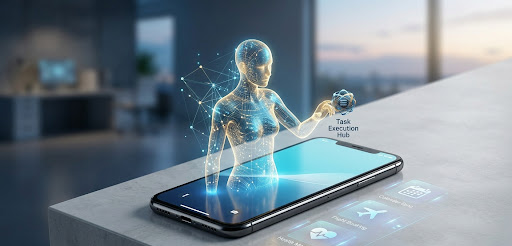
  • AI Agents: They are proactive. They don’t just tell you about a flight; they monitor price drops, check your Outlook calendar for conflicts, and execute the booking using your stored payment method—all without you lifting a finger.

[IMAGE 1 START: The “Digital Proxy”]

AI Agents revolution 2026 technology trends USA

This shift from “Large Language Models” (LLMs) to “Large Action Models” (LAMs) is the science that is currently redefining the US economy.

2. The Tech Stack: How 2026 Changed the Game

The reason we are seeing this explosion now is due to three major scientific breakthroughs that matured this year:

  1. On-Device Neural Processing: Thanks to the latest NPU (Neural Processing Unit) chips in 2026 smartphones, AI doesn’t need to “call home” to a server for every thought. It happens locally, making it faster and more private.
  2. Multimodal Fluidity: AI can now “see” your screen and “hear” your tone. If you look stressed while reading an email, your agent can suggest drafting a polite boundary-setting response automatically.
  3. The Interoperability Standard: Major tech giants (Apple, Google, Microsoft) finally agreed on a shared protocol that allows AI agents to “talk” to different apps seamlessly.
AI Agents revolution 2026 technology trends USA

3. Impact on the US Workforce: A New “Theory” of Productivity

There has been a lot of fear regarding AI taking jobs. However, the data coming out of US tech hubs in early 2026 suggests a different trend: Augmentation over Replacement.

In fields like Data Analysis and Digital Marketing, the “grunt work” (sorting spreadsheets, SEO keyword tagging, basic coding) is now 90% handled by agents. This leaves the human “Strategist” to focus on the “Theory”—the creative spark that AI still struggles to replicate.

TheDailyTheory Insight: We are moving toward a “1-Person Company” model. With a fleet of AI agents, a single entrepreneur in a garage in Seattle can now operate at the scale that previously required a staff of ten.

4. The Science of Digital Trust: Can We Trust the “Agents”?

As these systems become more autonomous, a scientific and ethical question arises: Alignment.

If you tell your AI agent to “Save me money on my monthly bills,” and it decides to cancel your gym membership because you haven’t gone in three weeks—did it do a good job, or did it overstep?

The University of Stanford’s 2026 AI Ethics Report highlights that the biggest challenge isn’t the AI’s intelligence, but its “Contextual Wisdom.” Understanding that a human might want to keep a gym membership despite not using it is a level of nuance that developers are still perfecting.

5. Consumer Tech: The Hardware Shift

We are seeing a decline in traditional smartphone sales in the USA for the first time in a decade. Why? Because Wearables are catching up.

  • AI Glasses: Brands are launching sleeker, non-bulky glasses that act as the “eyes” for your agent.
  • Neural Pins: Small devices that clip onto your clothing, focusing entirely on voice and gesture-based AI interaction.

The theory here is that we are moving toward “Invisible Computing.” You won’t look at a screen; you will just live your life, and the tech will assist you in the background.

6. Security in the Age of Autonomy

With great power comes great risk. In 2026, “Identity Theft” has evolved into “Agent Hijacking.” If a hacker gains access to your personal AI agent, they don’t just have your password; they have your Digital Proxy.

US cybersecurity firms are now pivoting toward Biometric Behavioral Verification. This means your AI agent constantly checks if the “vibe” of the commands it receives matches your unique personality and usage patterns.

7. Conclusion: The Human Element

At the end of the day, TheDailyTheory.com believes that while technology evolves exponentially, human nature changes slowly. We still crave connection, creativity, and purpose.

The AI Agent revolution isn’t about making us lazy; it’s about removing the “digital friction” that consumes our days. Imagine a world where you spend zero minutes on “admin tasks” and 100% of your time on what you actually love. That is the promise of 2026.

What Is SMP (Symmetric Multi-Processing)? A Complete Guide

0
What is SMP

Modern computer systems are designed with this purpose in mind so that they can easily handle huge amounts of work with multitasking and very complex applications, and that is the reason they are designed in this way. In order to obtain greater performance and efficiency, computers can be designed in such a way that multiple processors can be used instead of relying on a single CPU. For this complex purpose, one such popular system is SMP.

If you are still thinking about what is SMP, how it works, and why it is important in modern computers, then here is the detailed guide that will explain everything to you in a simple and easy way.

Understanding What Is SMP

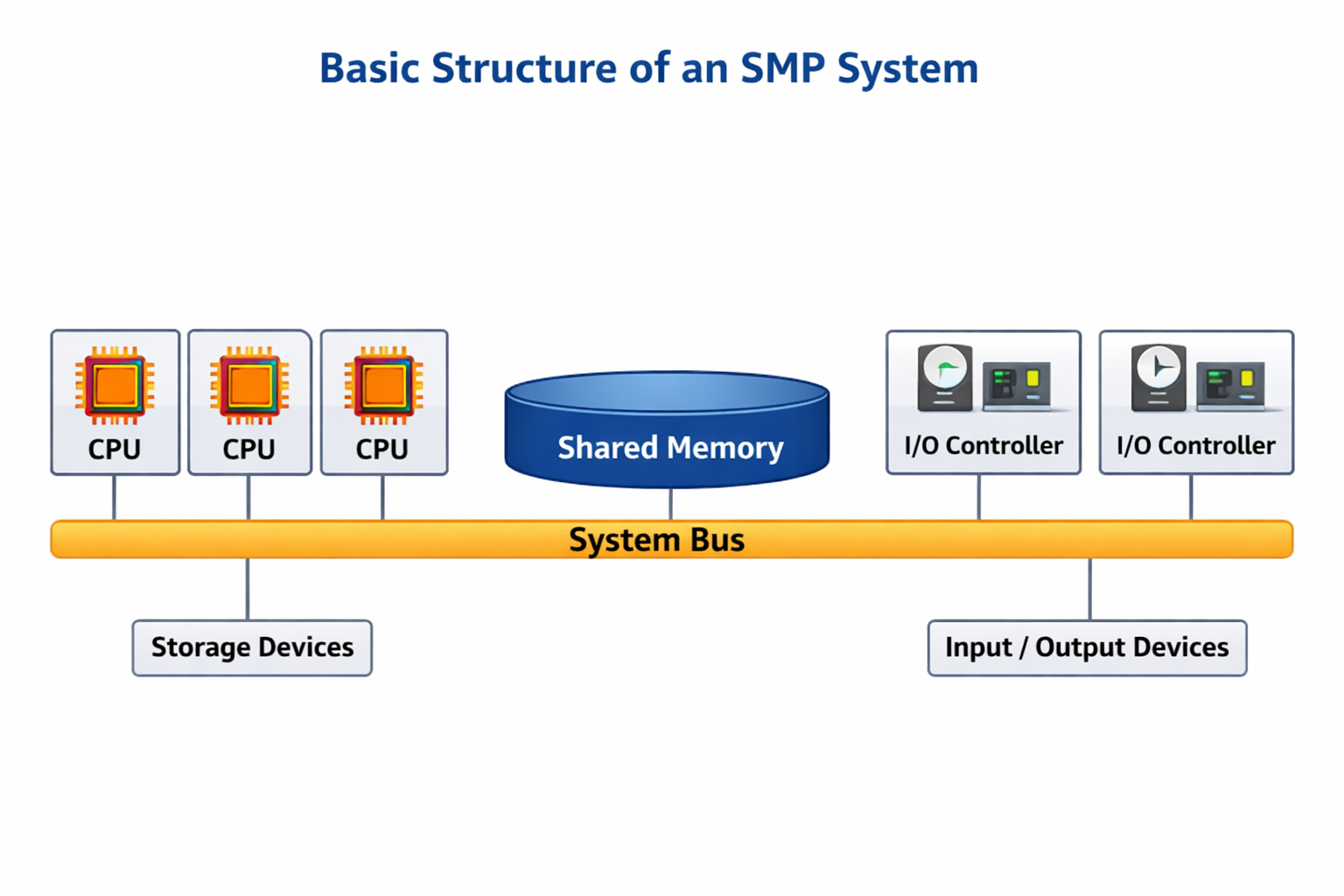
SMP (Symmetric Multi-Processing) is a computer architecture where two, three, or more identical processors are working together and are using the same operating system and only one common main memory.

No matter the number of processors in the system, they are all treated equally and are the reason all the processors in the system can do the same jobs.

In any computer system, there are cases where one processor controls the other processors in the system. But in the SMP system, any processor in the system can work independently. Moreover, the processor can cooperate easily with the other processors in the system.

SMP can be understood in simple terms as many CPUs working together in the same system so that the tasks in the system are done faster.

It can be understood more easily as a team working on a project. If only one person in the team does all the work in the project, it will take more time. But when many people in the team are working together at the same time, the tasks are done faster.

Diagram: Basic Structure of an SMP System

What is SMP

This diagram shows that multiple processors connect to the same memory and I/O devices, which allows them to work together efficiently.

How SMP Works

To fully understand what is SMP, it’s important to know how it operates internally.

In an SMP system:

Multiple processors are connected to the same shared main memory.
All processors use the same operating system.
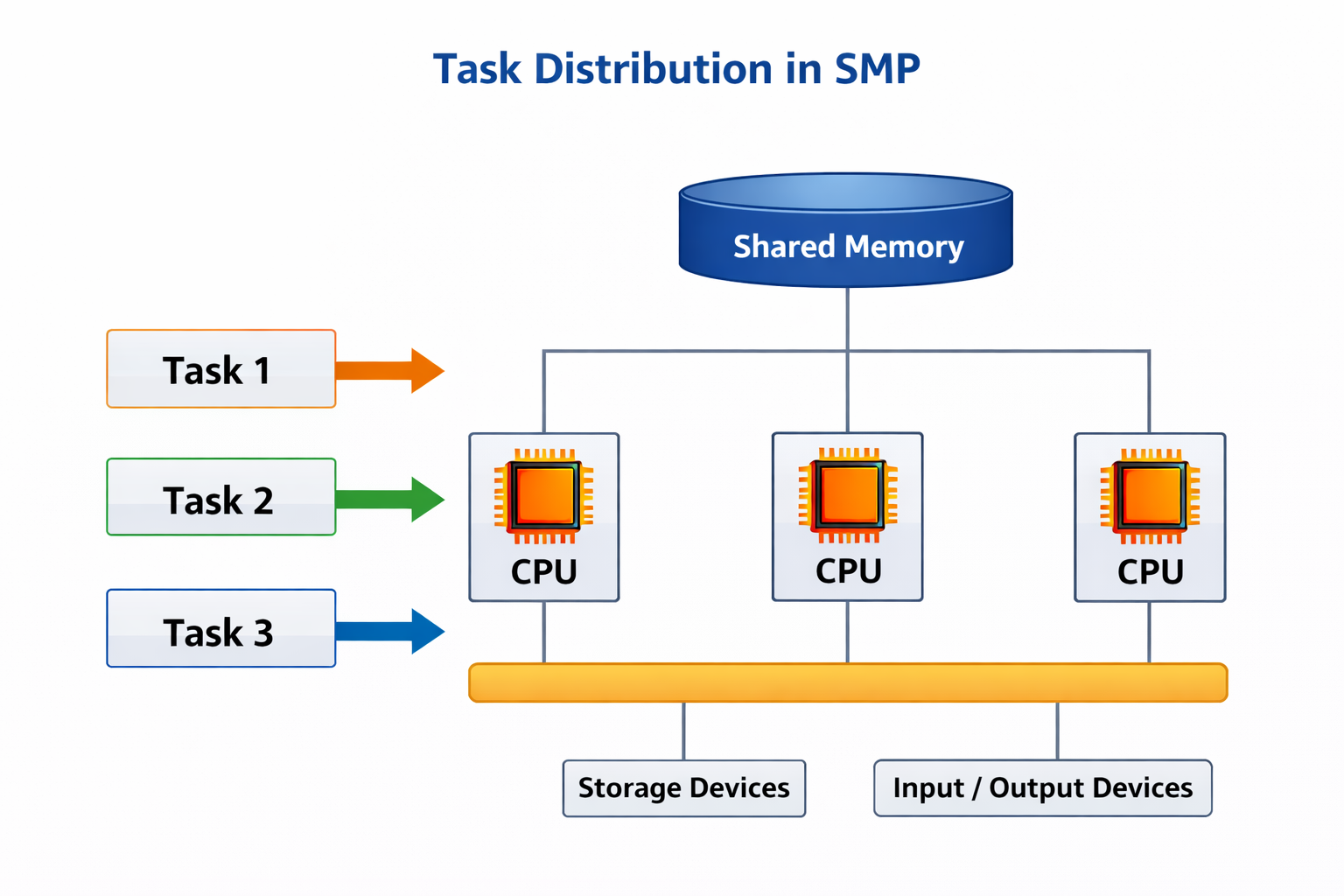
The operating system distributes tasks among processors.
Each processor can execute processes independently.

When a task arrives, the operating system decides which processor should handle it. If multiple tasks are running, they are distributed among the available processors.

For example, if a system has four processors, the workload can be divided so that each processor handles a portion of the tasks at the same time. This results in faster execution and better performance.

Diagram: Task Distribution in SMP

What is SMP

The operating system acts like a manager, assigning different tasks to different processors.

Key Characteristics of SMP

There are several features that define an SMP system.

Identical Processors

One of the most important characteristics of SMP is that all processors are identical. This means each processor has the same capability and performance level.

No processor acts as a master or controller. Every processor has equal responsibility in executing tasks.

Shared Memory

All processors in an SMP system share a single main memory. Because of this shared memory, processors can easily access the same data.

This feature also allows processors to communicate with each other quickly.

Shared Input and Output Devices

Processors in SMP systems can also access the same input and output devices, such as storage drives, printers, and network interfaces.

This ensures that all processors can perform operations involving data input and output without restrictions.

Parallel Processing

SMP supports parallel processing, meaning multiple operations can occur simultaneously.

For example:

  • One processor might handle system processes
  • Another processor might run applications
  • Another processor might manage background tasks

This parallel execution significantly improves system performance.

Diagram: Parallel Processing in SMP

Each processor executes a different task simultaneously, which speeds up the overall computing process.

Applications of SMP

Understanding what is SMP becomes easier when we see where it is used in real-world systems.

Servers and Data Centers

Many enterprise servers use SMP architecture to handle large workloads.

Servers often need to process thousands of requests at the same time, and SMP allows them to distribute this workload across multiple processors.

Parallel Computing

SMP systems are widely used in parallel computing environments, where large problems are divided into smaller tasks.

Examples include:

  • Scientific simulations
  • Weather forecasting
  • Large data analysis

These tasks require significant computing power, which SMP systems can provide.

Time-Sharing Systems

Time-sharing systems allow multiple users to use the same computer simultaneously.

SMP improves the efficiency of these systems by assigning different user processes to different processors.

Multithreaded Applications

Many modern software applications use multithreading, where multiple threads run at the same time.

SMP systems are ideal for multithreaded applications because each processor can execute a different thread simultaneously.

Examples include:

  • Video editing software
  • 3D rendering tools
  • Modern web servers

Diagram: SMP vs Single Processor System

This comparison clearly shows how SMP allows multiple tasks to run simultaneously, while a single processor must handle tasks one at a time.

Advantages of SMP

There are several reasons why SMP architecture is widely used in modern computing systems.

Higher Throughput

Throughput refers to the number of tasks a system can complete within a certain time period.

Because multiple processors work together in SMP, more tasks can be completed in less time.

Better Performance

SMP systems can handle heavy workloads more efficiently. When many programs are running simultaneously, the system distributes the tasks across processors to maintain smooth performance.

Improved Reliability

If one processor fails in an SMP system, the entire system does not stop working. The remaining processors continue executing tasks.

This improves the reliability of the system.

Efficient Resource Utilization

Since all processors share the same memory and devices, system resources are used more efficiently.

Idle processors can quickly take on new tasks assigned by the operating system.

Disadvantages of SMP

Although SMP systems have many advantages, they also have some limitations.

Complex System Design

Designing an SMP system is more complex than designing a single-processor system.

The operating system must manage multiple processors and coordinate their access to shared resources.

Higher Cost

SMP systems require multiple processors and larger shared memory, which increases hardware costs.

Because of this, SMP systems are usually found in high-performance computers and servers rather than simple personal computers.

Memory Access Conflicts

Since all processors share the same memory, conflicts may occur if multiple processors try to access the same data at the same time.

Special techniques are used to manage these conflicts and maintain system stability.

Final Thoughts

As you now know what SMP is, it is easy to understand why this kind of architecture is important in modern computing.

As a matter of fact, Symmetric Multi-Processing allows several processors to work together in a single system, sharing a common pool of resources while performing tasks simultaneously.

SMP technology is commonly used in servers, high-performance computing systems, as well as modern operating systems, because of its ability to process information quickly, as well as its multitasking capabilities.

As the demand for computing power increases, SMP, as well as other multi-processor architectures, will surely be important in powering the next generation of technology.